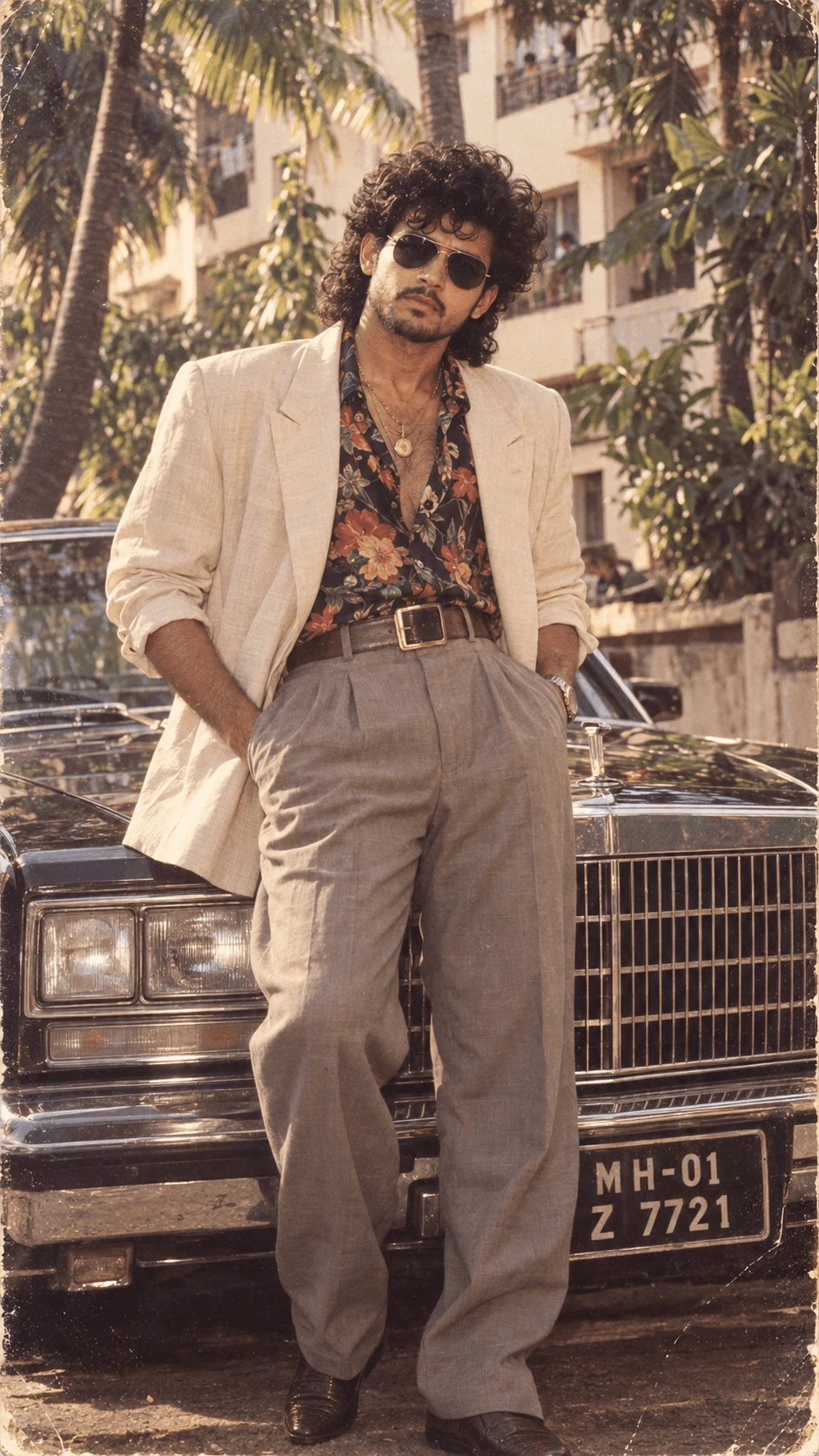
Late-1980s Aviator & Vintage Car Men's Fashion Portrait
Create an ultra-photorealistic late-1980s Indian men's fashion portrait featurin...

Transform your uploaded photo into an ultra-realistic formal portrait featuring a classic black tuxedo, crisp white shirt, warm golden confetti, glowing bokeh lights, cinematic studio lighting, and natural facial identity preservation.
Use the uploaded reference image strictly as the ONLY face reference.

Preserve the subject's exact facial structure, facial proportions, natural skin tone, hair texture, hairstyle characteristics, and recognizable identity with maximum accuracy.

Do not replace, redesign, morph, or beautify the face excessively. Do not create a generic model. The final subject must remain clearly recognizable as the same person from the uploaded reference.

Create a cinematic ultra-realistic 8K formal portrait of the subject dressed in a classic black tuxedo with a crisp white shirt and black bow tie. Add a clean pocket square for a refined formal appearance.

━━━━━━━━━━━━━━━━━━━━━━━━━━━━
COMPOSITION & FRAMING
━━━━━━━━━━━━━━━━━━━━━━━━━━━━

Create a medium close-up chest-up portrait.

Keep the subject centered in the frame.

Maintain confident but natural posture with relaxed shoulders.

Provide appropriate headroom.

Do not crop the top of the head, shoulders, or important facial features.

Use a natural portrait perspective with balanced proportions.

━━━━━━━━━━━━━━━━━━━━━━━━━━━━
EXPRESSION & GAZE
━━━━━━━━━━━━━━━━━━━━━━━━━━━━

Give the subject a warm, confident and natural smile.

Maintain direct eye contact with the camera.

The expression should communicate:

• confidence
• warmth
• celebration
• sophistication
• natural happiness

Do not create an exaggerated or artificial smile.

Preserve the subject's recognizable eyes and facial characteristics.

━━━━━━━━━━━━━━━━━━━━━━━━━━━━
FORMAL WARDROBE
━━━━━━━━━━━━━━━━━━━━━━━━━━━━

Dress the subject in a classic black tuxedo.

Include:

• tailored black tuxedo jacket
• crisp white dress shirt
• black bow tie
• clean formal pocket square

The clothing should have realistic tailoring, textile texture, natural folds, subtle highlights, and believable fabric construction.

Keep the wardrobe sophisticated and clean without unnecessary accessories.

━━━━━━━━━━━━━━━━━━━━━━━━━━━━
ENVIRONMENT & BACKGROUND
━━━━━━━━━━━━━━━━━━━━━━━━━━━━

Create a festive celebratory atmosphere filled with floating golden confetti and dense shimmering bokeh lights.

The background should be completely blurred.

Remove distracting environmental edges, objects, walls, or visible background boundaries.

Create a seamless luminous golden backdrop.

Use layered golden bokeh throughout the background to create depth.

━━━━━━━━━━━━━━━━━━━━━━━━━━━━
GOLDEN CONFETTI
━━━━━━━━━━━━━━━━━━━━━━━━━━━━

Add reflective golden confetti suspended throughout the scene.

Include confetti in:

• foreground
• middle distance
• background

Vary the size and focus of individual pieces.

Some pieces should be sharply defined while others should have subtle motion blur.

Create realistic reflections from the surrounding golden lights.

Do not overcrowd the frame.

━━━━━━━━━━━━━━━━━━━━━━━━━━━━
LIGHTING
━━━━━━━━━━━━━━━━━━━━━━━━━━━━

Use soft warm cinematic lighting.

Create a gentle frontal key light that illuminates the face evenly.

Add subtle rim or back lighting around:

• hair
• shoulders
• tuxedo edges

Use warm ambient reflections from the golden environment.

Maintain accurate facial exposure.

Avoid:

• harsh shadows
• blown highlights
• excessive contrast
• unnatural skin brightness

Keep the face clear and naturally illuminated.

━━━━━━━━━━━━━━━━━━━━━━━━━━━━
DEPTH OF FIELD
━━━━━━━━━━━━━━━━━━━━━━━━━━━━

Use an 85mm portrait lens aesthetic.

Recommended aperture:

f/1.8

Create a shallow depth of field with creamy background separation.

Keep the face and eyes sharply focused.

Allow the golden confetti and background lights to gradually fall out of focus according to their distance from the camera.

Create convincing optical depth rather than artificial blur.

━━━━━━━━━━━━━━━━━━━━━━━━━━━━
COLOR & MOOD
━━━━━━━━━━━━━━━━━━━━━━━━━━━━

Use a rich golden color palette.

Dominant visual tones:

• warm gold
• black
• clean white
• natural skin tones
• subtle amber highlights

Create a celebratory, polished and sophisticated mood.

Maintain consistent golden color grading throughout the frame.

Avoid excessive yellow or orange skin tones.

Keep the subject's natural complexion accurate.

━━━━━━━━━━━━━━━━━━━━━━━━━━━━
SKIN & FACIAL DETAIL
━━━━━━━━━━━━━━━━━━━━━━━━━━━━

Preserve realistic skin texture.

Show:

• natural pores
• realistic skin detail
• authentic facial shadows
• natural lips
• detailed eyes
• realistic hair texture

Avoid:

• plastic skin
• excessive smoothing
• artificial beauty filters
• unnatural skin whitening
• wax-like facial appearance

The face should look like a real professionally photographed person.

━━━━━━━━━━━━━━━━━━━━━━━━━━━━
PHOTOREALISM
━━━━━━━━━━━━━━━━━━━━━━━━━━━━

Create ultra-realistic professional DSLR-quality photography.

The final image should contain realistic:

• human skin
• facial details
• hair
• tuxedo fabric
• shirt texture
• bow tie
• pocket square
• confetti
• bokeh
• reflections
• lighting
• shadows

Do not make the image look illustrated or computer-generated.

Avoid:

• cartoon
• anime
• painting
• illustration
• CGI
• 3D render
• plastic skin
• artificial facial features

━━━━━━━━━━━━━━━━━━━━━━━━━━━━
TECHNICAL DETAILS
━━━━━━━━━━━━━━━━━━━━━━━━━━━━

Ultra-realistic 8K photographic detail.

Professional full-frame DSLR aesthetic.

85mm portrait lens.

f/1.8 shallow depth of field.

Sharp facial focus.

Natural optical bokeh.

Balanced HDR.

Cinematic contrast.

Natural color reproduction.

Studio-grade finish.

1:1 square aspect ratio.

━━━━━━━━━━━━━━━━━━━━━━━━━━━━
FINAL RESULT
━━━━━━━━━━━━━━━━━━━━━━━━━━━━

Create an ultra-realistic cinematic formal portrait of the same person from the uploaded reference, dressed in a classic black tuxedo with a crisp white shirt, black bow tie, and clean pocket square.

Place the subject in a centered chest-up composition with a warm confident smile and direct eye contact.

Surround the subject with floating reflective golden confetti and dense glowing bokeh lights against a seamless blurred golden background.

Use soft frontal illumination, subtle rim lighting, natural skin texture, sharp facial detail, shallow 85mm f/1.8 depth of field, cinematic golden color grading, realistic reflections, and professional full-frame photography.

The final image should feel celebratory, polished, sophisticated, natural, and authentically photographic.

MOST IMPORTANT:

SAME PERSON AS UPLOADED REFERENCE.
PRESERVE FACIAL IDENTITY.
PRESERVE NATURAL SKIN TONE.
PRESERVE HAIR CHARACTERISTICS.
NATURAL FACIAL PROPORTIONS.
BLACK TUXEDO.
WHITE SHIRT.
BLACK BOW TIE.
GOLDEN CONFETTI.
GLOWING GOLDEN BOKEH.
85MM PORTRAIT AESTHETIC.
SHARP FACE.
NATURAL SKIN TEXTURE.
ULTRA-PHOTOREALISTIC.
1:1 PORTRAIT COMPOSITION.
Learn how to use this prompt effectively and maximize the quality of your AI-generated output.
Transform your uploaded photograph into a sophisticated golden confetti tuxedo portrait with this professionally crafted AI photo editing prompt. The concept preserves the subject's recognizable facial identity, natural skin tone, hair characteristics, facial proportions, and overall appearance while introducing a polished formal wardrobe and celebratory studio environment.
The subject wears a classic black tuxedo with a crisp white shirt, black bow tie, and refined pocket square, creating a timeless formal appearance. Warm golden confetti, shimmering bokeh lights, soft cinematic illumination, and an 85mm portrait aesthetic provide a festive backdrop with layered depth and a refined celebration atmosphere.
Dresses the subject in a sharply tailored black tuxedo with a crisp white shirt, black bow tie, and clean pocket square for a distinguished formal appearance.
Surrounds the subject with floating golden confetti, shimmering highlights, and luminous bokeh to create an immersive festive environment.
Uses the uploaded image as the primary face reference while maintaining recognizable facial structure, natural complexion, hair texture, and authentic appearance.
Uses a medium close-up composition with shallow depth of field, creamy background separation, sharp facial detail, and natural cinematic perspective.
This prompt is ideal for photographers, content creators, professionals, social media users, event photographers, and anyone who wants to transform a personal photograph into a polished formal celebration portrait suitable for profiles, invitations, festive posts, or special occasions.
Why You'll Love It
This prompt combines formal menswear styling with a glowing celebration backdrop without sacrificing natural facial detail. The black tuxedo provides a strong visual foundation while golden confetti, luminous bokeh, warm illumination, and shallow depth of field create a polished studio portrait with genuine photographic depth.
Follow these steps to transform your uploaded photograph into a polished formal celebration portrait while keeping the original person's identity natural and recognizable.
Use a clear reference photograph with the face unobstructed and good natural lighting. For the most convincing result, keep the face and eyes extremely sharp while allowing the golden confetti and bokeh lights to soften progressively with distance. This creates genuine portrait depth without making the subject appear artificially processed.
Explore more photo effects & filters prompts similar to this one.
Create an ultra-photorealistic late-1980s Indian men's fashion portrait featurin...
Transform your uploaded photo into a realistic Minecraft-inspired world while pr...
Recreate an emotional 1987 Indian street moment where the same person has just r...
Create an amazing result using this prompt and share it with the Prompt Locator community. Selected submissions may be featured in this gallery to inspire other creators.
Help us keep Prompt Locator safe by reporting inappropriate content.
Help improve this prompt by submitting your suggestion.

